

Wednesday, October 14, 2026
Run a playbook on a schedule
Playbooks can now run on a schedule and gather open tasks with the new Find tasks step, now available to everyone.
Wanted a morning list of overdue tasks without putting it together by hand? Until now, a playbook only ran when something happened.
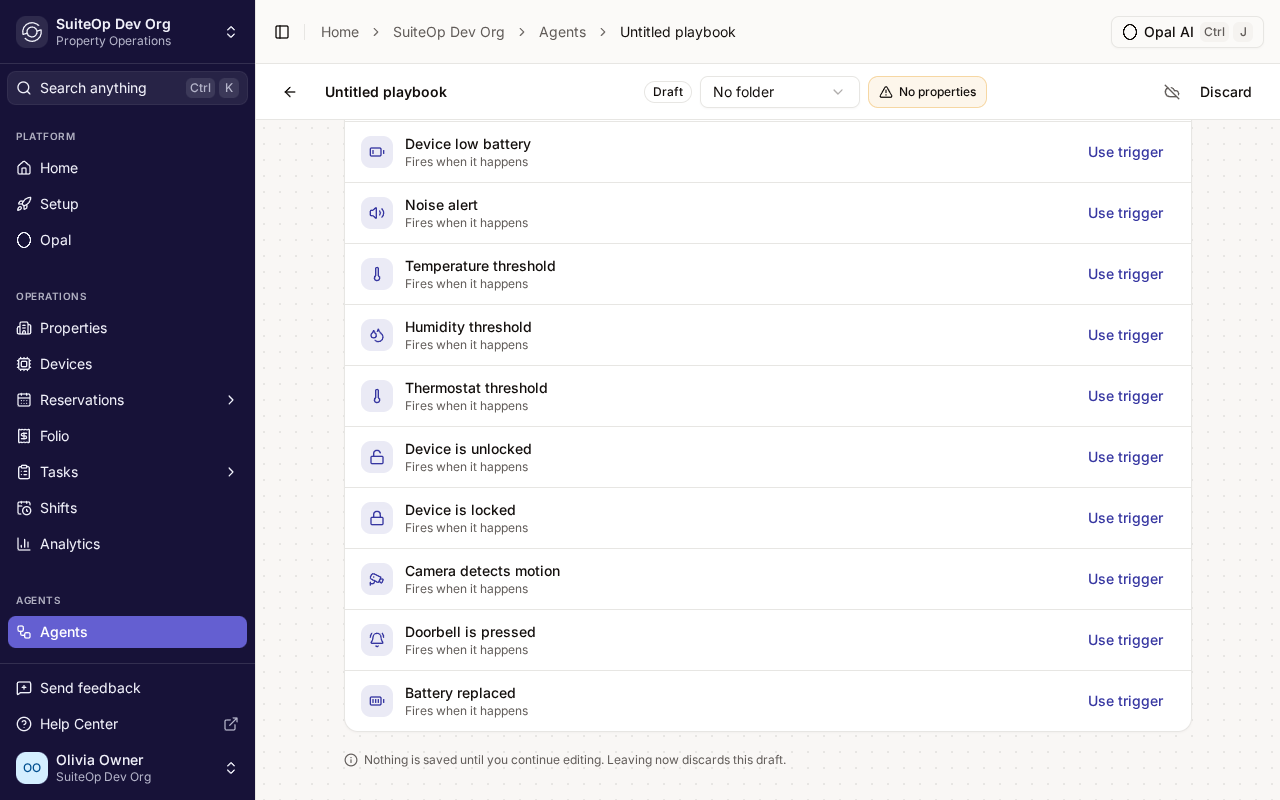
Playbooks can now run On a schedule: on chosen days at a set hour, every few hours, every few days or monthly, in the time zone you pick. Pair it with the new Find tasks step to gather open tasks by department, template, status, assignee or due date, then post the list to Slack or work through it in later steps.
Open a playbook, click Add Trigger, and choose the Schedule category. When Find tasks comes back empty, the run stops by default, so nobody gets an empty message.
The schedule starts when you publish, and a run can begin up to 15 minutes after the hour. You need the Manage agents permission to build playbooks.
Choose the door code when you change a guest's code
Change code on a reservation now lets you type the PIN yourself instead of generating a random one, now available to everyone.
A guest asked for a code they’ll remember? Until now, Change code could only generate a random one.
You can now pick: Generate a code as before, or Enter a code and type the PIN yourself. Every door on the stay gets that PIN, and the previous code is retired.
Open the reservation, click Change code, choose Enter a code and type the New PIN: digits only, at your organization’s code length.
SuiteOp checks the PIN against the codes already in use before it installs it. If it can’t use your PIN, it says so rather than quietly swapping in a random one.
See your team's day hour by hour
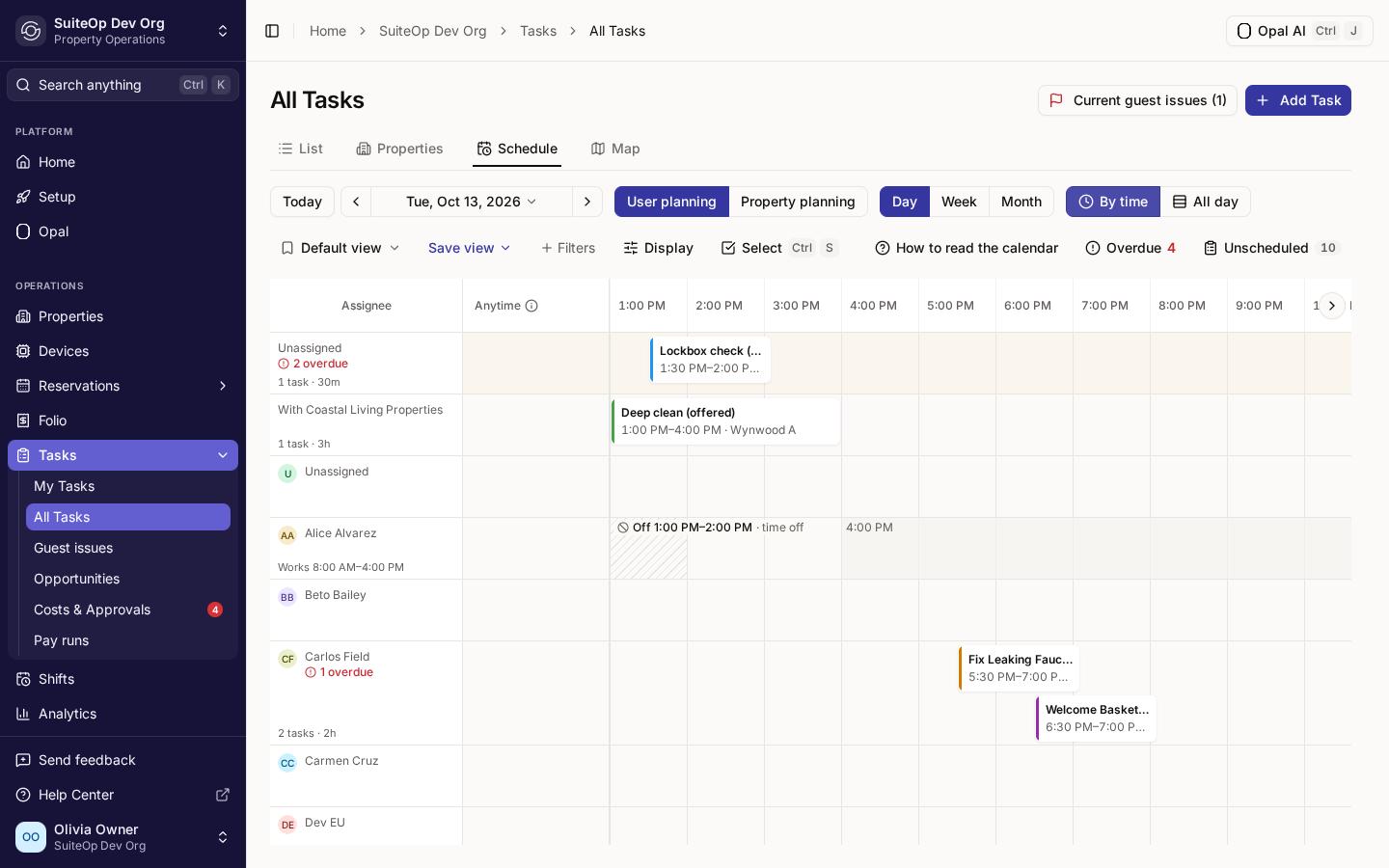
The Day view's By time layout is now an hourly timeline that shows how long each task runs and when each person works, is off, or is free.
Trying to work out who’s free at 2 PM? The Day view used to group work into two-hour bands, which hid how long jobs take and when people are actually around.
By time is now an hourly timeline. Each task stretches across its hours, from its planned start or its time window, for as long as its estimate. A task shorter than about an hour and a half gets a wider card so its name fits, so go by the times printed on the card. Each person’s row shows their working hours, part-day time off and days off, and on today a line marks the current time.
Open Tasks, then All Tasks, the Schedule tab, Day and By time. Drag a task to an hour to plan its start, onto Anytime to clear the planned start, or onto Unscheduled to take it off the day. Each move asks before it saves. Display turns working hours and time off on or off.
Times follow your organization’s time zone, and a task with no estimate counts as 30 minutes.
Plan the next battery change the moment you replace one
A new Battery replaced trigger runs a playbook whenever someone marks a device's battery as replaced, now available to everyone.
Just swapped the batteries on a lock? Until now, remembering when the next change was due was up to you.
The new Battery replaced trigger runs a playbook whenever someone marks a device’s battery as replaced. Add a Create task step due, say, 90 days after it runs, and the next battery change is on the calendar before the screwdriver is back in the drawer.
On the device, click Mark as replaced under Battery Replacement. To build the playbook, click Add Trigger and pick Battery replaced from the device triggers.
The playbook runs once for each property the device belongs to.
- Reservations Jump from your PMS straight to the stay in SuiteOp. When your PMS supports it and the integration's Custom fields push control is on, new reservations from your PMS now get a SuiteOp staff link written onto them, so you can open the stay in SuiteOp from your PMS instead of searching for it.
- Properties Open a property without leaving the list. Clicking a property on the Properties list now opens it in a panel beside the list, with its readiness, today's tasks and stays. The full property page is still one click away.
- Tasks A clearer planning calendar. Stay bars in the calendar's property view now show the booking status, the number of nights, and an arrow when the stay began before the week on screen. The Day view and the Unscheduled panel also tell you when your filters are hiding work, rather than looking empty.
- Tasks Auto-assign keeps everyone's day on time. Auto-assign no longer hands someone a task that would make their other jobs late, crew and shared jobs included, when someone else could take it on time. When everyone is already over their daily hours, it gives a due task to someone who can finish it on time before falling back to whoever has the least work.
- Guest Portal Choose the language guests see first. Each language that's on under Settings, Languages now has a Make guest default button, English included. Guests see the portal in their browser's language when SuiteOp supports it, and in your guest default otherwise.
- Guest Portal Wallet passes stay with the guest. Guests can no longer share wallet passes that carry door codes from Wallet itself. Apple Wallet hides the Share button, and a Google Wallet pass stays with one traveller, on their own devices.
- Access codes See which properties the guest-code setting skips. The guest code setting under Settings, Smart locks now says it applies only to properties with generated codes, counts the properties it skips, and links to Properties to change their code type.
- Integrations Owners can connect ecobee SmartBuildings and Mews themselves. Property owners can now connect their own ecobee SmartBuildings and Mews accounts from a connect link you send them. For Mews, the owner picks which services to sync.
- Guest content Spot guides missing a cover image. The Guides list now shows each guide's cover thumbnail, and Guides and Manuals both have a Has image filter.
- Mobile app A friendlier mobile app. On the Tasks tab, Create task is now a button at the bottom right, within thumb reach. Report issue lists only your own departments, maintenance and the task's department, every code on a property's full access list has a Copy button, the iPhone time-tracking timer has a colour for each state, and dark mode no longer flashes white between screens.
- Languages More of SuiteOp in your language. Department names now show in your language across analytics, costs, member pages and templates, as they already did on tasks, and so do device types on a property's Devices tab. Integration activity headings, task durations and guide categories are translated too, and Dutch emails and wallet passes now use the same informal je as the app.
- Payments A check before you deactivate a payment account. Mark inactive on a payment account now asks first and tells you how many property and group defaults it will clear. Mark active is still one click.
+51 fixes
- Playbooks A step skipped inside a Repeat no longer ends the whole Repeat, so the remaining items still get their turn, and the skip reason shows in your language.
- Playbooks Two playbooks that trigger each other by marking guests checked in or out, adding reservation labels or creating service fees now stop after 10 rounds instead of looping.
- Playbooks Guest check-in, check-out and verification playbooks no longer run for a stay that moved to another property after the trigger fired.
- Tasks Assigning or moving one task no longer reshuffles the rest of the day; everyone else keeps the tasks they hold unless they can no longer do them.
- Tasks On mobile, every question in a multi-question checklist group can be answered, and a short pause while typing no longer cuts an answer off.
- Tasks On mobile, the Tasks tab no longer shows an error page when you switch the day or team while scrolled down the list.
- Tasks General steps placed after the walk-through now appear after it, where the template puts them, instead of at the top.
- Tasks Saving a task template no longer silently drops new sections or spaces that have no requirement yet; a message says they weren't saved, and when nothing else changed they stay in the builder.
- Tasks A paused task's pause stays visible on the Time window tab when the task runs late or is read the next day.
- Tasks Tasks without a property now move to your organization's new time zone when you change it.
- Tasks Saving a recurring schedule no longer stalls for up to two seconds.
- Tasks On a worker's task link, a signed-in manager's comment, tick or status change now goes through instead of being dropped.
- Tasks Members whose role lets them manage only their own availability can now open and save their working hours on web and mobile.
- Access codes A new manual door code can no longer reuse a PIN that a departed guest's code still holds on the lock.
- Access codes On Seam-connected, Schlage, RemoteLock and TT Lock locks, a guest whose cancelled stay is reinstated while its door code is being removed gets a working code back on the lock.
- Access codes Door codes imported from your PMS show as not active yet, valid from check-in, until the stay starts, instead of Active.
- Devices Seam-connected locks that relock on their own no longer stay "Unlocked" in SuiteOp after someone opens the door.
- Devices Devices on a disconnected integration show their connection as unknown instead of a stale "online".
- Devices Yale and August locks whose bridge is offline now show Offline and send the offline alert.
- Devices The Devices list says why a lock whose setup never finished needs attention.
- Devices A building-entrance lock shared through a property group now lists its properties on the Devices page instead of "No property assigned".
- Devices Members with access to only some properties no longer see other properties' names on shared devices.
- Devices Archived devices no longer count toward the device totals on the Properties page.
- Devices TT Lock entry history keeps arriving after a lock's gateway is unplugged or added.
- Devices Changing a thermostat twice in quick succession no longer shows the guest a failure message or makes Alexa report an error.
- Devices On mobile, a unit's own lock no longer shows up on its neighbouring units in the same building.
- Integrations When a Seam or Calry connection no longer exists on the provider's side, SuiteOp now asks you to reconnect it instead of retrying quietly.
- Integrations Broken-integration reminders arrive on schedule again after an earlier recovery, instead of going quiet for a week.
- Integrations Hostfully booking history imports no longer stop partway on some bookings.
- Integrations Unmapping a PMS listing on a slow connection no longer leaves the old mapping on screen.
- Integrations The Apaleo services card names the permission you're missing instead of offering a Try again that can't work.
- Guest Portal The guest portal's door code fits on narrow phone screens instead of being cut off.
- Guest Portal Links, door-code statuses and the ID-check screens in the guest portal stay readable on dark, purple and mid-tone brand colours.
- Guest Portal Apple Wallet passes show the guest's check-out time from the day before check-out, in every region.
- Guest Portal A guest's wallet pass updates within seconds once their door code is confirmed on the lock.
- Guest Portal The check-in preview shows a Static-code property's real door code instead of a sample.
- Guest verification The ID-check selfie camera frames the guest's whole head.
- Reservations The reservation panel shows a "Fees (may include cleaning)" row for Guesty and Calry stays whose fees can't be split, so the totals add up.
- Reservations Guesty cleaning fees on accounts that report them with VAT included now line up with the rest of the stay's net prices.
- Reservations Guesty stays on accounts that mark up fees now include that markup in the other fees and the fee total.
- Reservations Avantio owner stays come in as confirmed owner stays, so they show on the Reservations page and under the Owner Stay source, instead of as blocks.
- Sign-in Continue with Google works again on the web app.
- Settings Switching your language takes effect right away for members whose home region differs from their organization's.
- Settings Translated text fields wait for their saved text before you can type, so what you type is no longer replaced when it loads.
- Properties Copy WiFi reaches every property in portfolios of more than 500.
- Properties Members who can view but not edit properties see check-in instructions read-only, instead of an editor that couldn't save.
- Properties Long owner and group names stay inside the property Identity card, so Edit owner stays clickable.
- Settings Money fields leave room for longer currency symbols such as CHF and AED.
- Settings Billing add-on cards, notification settings and the Members page tabs fit on phone screens.
- Settings Error messages appear beside an open side panel instead of covering its buttons.
- Opal The Opal page no longer slides under the sidebar, and its Conversations drawer stays out of the way in Arabic and Hebrew.