


Thursday, October 15, 2026
Turn on the selfie movement check
You can now switch on the selfie movement check in your identity check step, so guests blink and turn their head to prove the selfie is live.
Worried a guest could hold up a photo instead of taking a real selfie? Until now, the movement check couldn’t be switched on.
The selfie movement check asks the guest to blink and turn their head, and checks those frames against the selfie. A blink with one eye counts too, so guests who can only close one eye can still pass.
Open Settings, then Verification steps, and open your identity check step. In ID check policy, set The selfie movement check to Allow one retry or Stop and review.
It starts on Disabled, so nothing changes until you turn it on. It needs Ask for a selfie to be on. If manual upload is on, a guest who can’t do the movement check can upload a selfie instead, and it goes to your team for review.
Needs attention now flags a missing unit code or guest portal
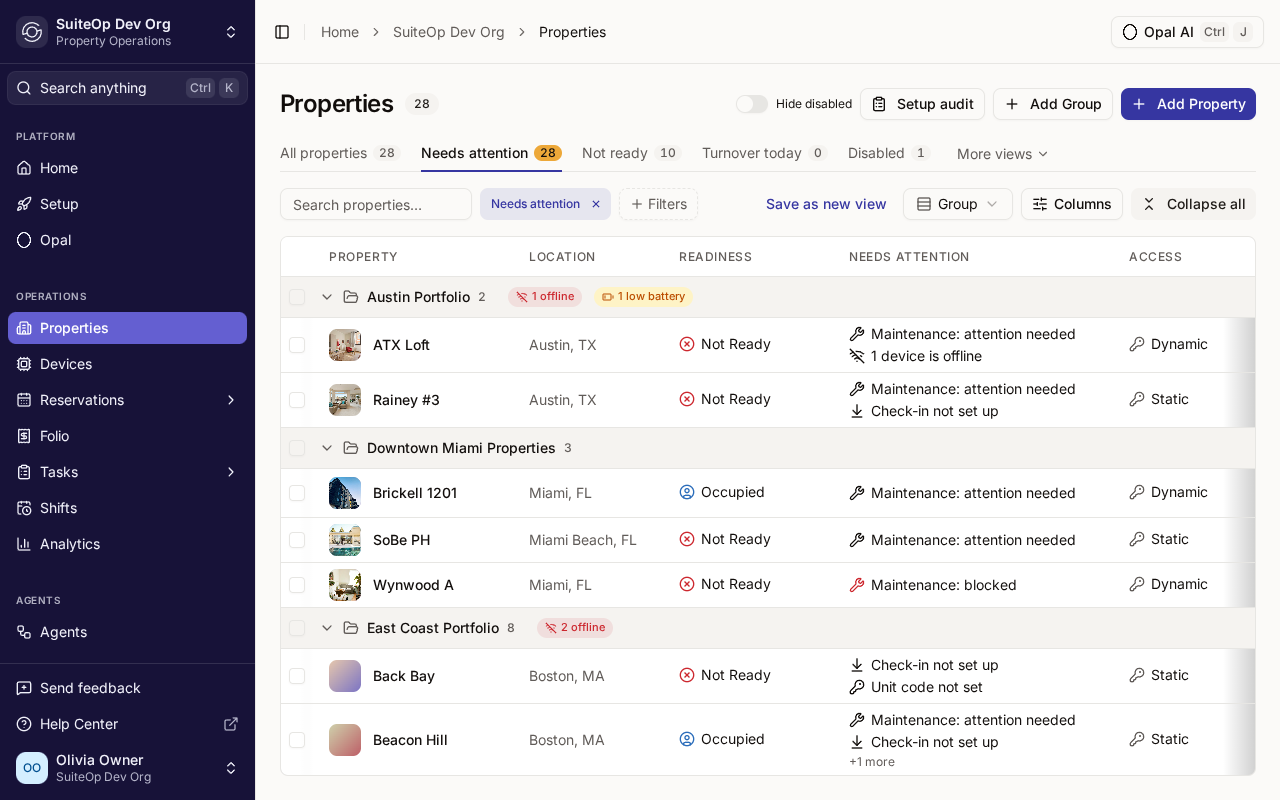
The Needs attention tab on Properties now also lists properties with a blank unit code or no guest portal, so you can fix them before a guest finds out.
Onboarding a lot of units at once? Until now, a property with no door code or no guest portal looked fine on the list until a guest arrived and hit the gap.
Needs attention now also flags Unit code not set when a property uses a fixed unit code that’s blank, and No guest portal when no portal reaches the property. Each reason links straight to the setting that fixes it.
Open Properties and the Needs attention tab. The tab count and select-all bulk edit include these properties too.
A property covered by your organization’s default portal isn’t flagged. A portal assigned through a group or tag counts as well.
A guest report that answers the question on page one
The downloadable guest report has a new layout, with the guest's verification status, the stay and the key evidence on the first page.
Sending a guest report for a dispute or a claim? The old layout made the reader dig for the one thing they wanted: is this guest verified?
Page one now opens with a card showing the guest’s verification status, or Blacklisted, and the stay’s facts, then one tile per verification step, the guest’s ID beside their signature under Key evidence, and a count of what’s In this report. The time zone sits right under the letterhead, tables share one style, ID images use the full page width, and the report closes with End of report.
Open the reservation, go to SuiteVerify and click Guest report.
Nothing new is shared: the report includes the same sections and follows the same permissions as before.
- Tasks Spot a problem in someone's week at a glance. In the Schedule's Week view, each person's header now shows their open tasks and usual hours, plus one alert when something's off, such as overdue work, going over their hours, work on a day off, or overlapping tasks. Hover the alert to see the rest.
- Tasks Schedules keep up with team changes. Open Week and Month schedules now refresh on their own when someone joins or leaves a department, is invited, suspended, reactivated or removed, or a department is archived, so nobody plans around days off that no longer apply.
- Mobile app Tidier sheets in the mobile app. Most bottom sheets in the mobile app now have a centred title and a Close button at the top right, and none grows past 90% of the screen.
- Design Status colours that mean the same thing everywhere. A shift in progress and automation processing now show in blue, pending time off in amber, and a cancelled shift in grey, on web and mobile. Mobile status text and text fields also match the web app.
- Languages Your language on every new device. Signing in on a new browser now opens SuiteOp in the language set on your account rather than the browser's, unless your account is set to English.
+20 fixes
- Access codes A late checkout now gives back the door code for a door whose code had ended early while another door of the stay was still open (Salto doors aren't covered yet).
- Access codes A door code you remove at the lock no longer comes back on its own after its stay was cancelled and quickly reinstated.
- Access codes Removing a door code from a lock that's offline or slow to answer now waits and tries again, instead of failing and waiting for a manual retry.
- Access codes Guest codes on Yale and August locks whose PIN is already taken on the lock now get a new PIN instead of retrying until they fail.
- Access codes After a date change, a shared TT Lock offline code no longer starts too late for a guest sharing it.
- Access codes Seam door codes already waiting on the lock before a stay no longer show as still being installed.
- Integrations Opera bookings deleted in Oracle are now cancelled in SuiteOp, and refreshing a live Opera booking works again.
- Integrations A guest's unit move in OwnerRez no longer gets undone by a later refresh.
- Integrations Mews property names no longer end in a long id code.
- Integrations Connecting or upgrading a PMS whose sign-in returns in a new tab now finishes in one go, without a reload or an error.
- Devices Nest thermostats no longer miss a mode or online change when part of the same update arrives malformed.
- Mobile app The Mark a day off, Different hours and task-move sheets on the mobile Working hours screen open again.
- Tasks Members who left a department can change their days on My home again.
- Tasks A deactivated member's in-progress task is now paused when their shift is closed overnight.
- Web app Date pickers low in a short dialog now open fully, so you can reach the next month.
- Properties The Properties list fits all its default columns on a 1440px screen, so Capacity is no longer cut off.
- Analytics Analytics KPI cards now fill each row, with no empty slots.
- Settings Adding a space label with an empty name now shows "Label name is required" in words.
- Settings Expired, unused public API connections now drop off Connected apps within a day.
- Languages Screen readers now announce the breadcrumb trail in your language.